
Resources are the individual cost components used in Self Perform estimating. They represent the labor, equipment, and other costs required to complete work and serve as the foundation for Crew and line-item cost calculations.
Table of Contents
Understanding Resources
A Resource represents a specific cost element used to perform work. Common Resource types include:
- Labor
- Equipment
- Other
Resources can be used individually or combined into Crews, which are then assigned to estimate line items.
Example Resources
|
Resource Type |
Resource Name |
|
Labor |
Carpenter |
|
Labor |
Pipefitter |
|
Labor |
Foreman |
|
Equipment |
Excavator |
|
Equipment |
Skid Steer |
|
Equipment |
Dump Truck |
|
Other |
Small Tools |
|
Other |
Survey Equipment |
Each Resource contains pricing information that contributes to estimate calculations.
How Resources Are Used
Resources are the building blocks of Self Perform estimating. A typical workflow is:
Resource Fields
Resources contain several important fields:
|
Field |
Description |
|
Defined At |
Indicates where the Resource was created. Resource are defined in either Cost Library or an individual estimate. |
|
Code |
Unique Resource identifier |
|
Name |
Resource name |
|
Base Rate |
Starting cost before markups |
|
Unit |
Unit of measure |
|
Markup Total |
Combined value of applied Resource Markups |
|
Resource Rate |
Final calculated rate |
The Resource Rate is the cost ultimately used in Crew and estimate calculations.
Resource Rate Formula
Base Rate + Resource Markups = Resource Rate
Example
Resource Types
Labor Resources
Labor Resources represent workers or labor classifications used in the estimate.
Examples include:
- Laborer
- Carpenter
- Electrician
- Foreman
- Superintendent
Example
|
Field |
Value |
|
Name |
Carpenter |
|
Base Rate |
$45.00/hr |
|
Unit |
Hour |
Equipment Resources
Equipment Resources represent machinery and vehicles required to perform work.
Examples include:
- Excavators
- Cranes
- Forklifts
- Pickup Trucks
- Concrete Pumps
Example
|
Field |
Value |
|
Name |
Excavator |
|
Base Rate |
$135.00/hr |
|
Unit |
Hour |
Other Resources
Other Resources represent additional costs that do not fall into Labor or Equipment categories.
Examples include:
- Small Tools
- Fuel
- Testing Equipment
- Safety Equipment
- Survey Equipment
- Temporary Facilities
Example
|
Field |
Value |
|
Name |
Small Tools |
|
Base Rate |
$6.00/hr |
|
Unit |
Hour |
Create a Resource
To create a resource:
- Open an estimate in DESTINI Cloud Estimator.
- Click Self Perform.
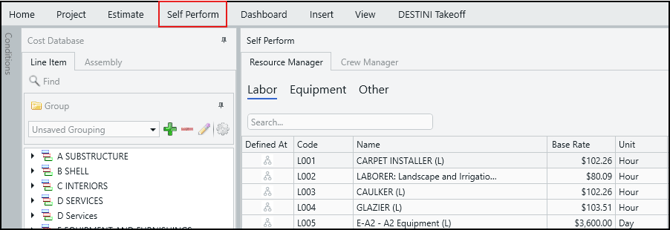
- Select either the Labor, Equipment, or Other tab.
- In the Rate Table list, select a rate table.

- Select Add Resource.
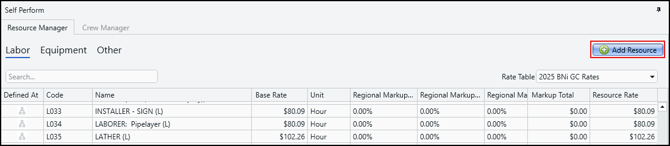 DESTINI Estimator creates a new row at the bottom of the list.
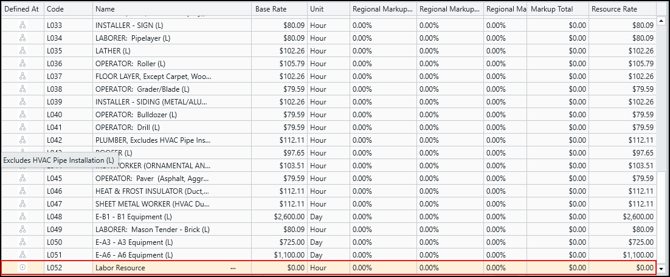
- Enter a name, base rate, and unit of measure.
- Press Enter on your keyboard to save the entry.
The Resource becomes available for use in Crews and estimate calculations.
Duplicate or Delete a Resource
To duplicate or delete a Resource:
- Open an estimate in DESTINI Cloud Estimator.
- Click Self Perform.
- Select the Resource you want to duplicate or delete.
- Click the ellipses (...) beside the Resource name.

- Choose either Duplicate Resource or Delete Resource.
Note the following important information:
-
If you're unable to duplicate or delete a Resource (it doesn't display an ellipses), it means the Resource was created in Cost Library. You can verify the Resource was created in Cost Library by the multi-tier icon in the Defined At column. Resource created in Cost Library can only be duplicated or deleted in Cost Library.
-
If a Resource is being used by one or more Crews, review the impact before deleting it.
Best Practices
Consider the following recommendations when managing Resources and Resource Markups:
- Use clear, consistent Resource naming conventions.
- Maintain standard Resources in Cost Library whenever possible.
- Separate Labor, Equipment, and Other costs appropriately.
Related Topics
- An Overview of Self Perform in DESTINI Cloud Estimator
- Working with Rate Tables in DESTINI Cloud Self Perform
- How to Create and Manage Rate Table Markups in DESTINI Cloud Self Perform
- How to Manage Resource Markups in DESTINI Cloud Estimator
- How to Create and Use Crews in DESTINI Cloud Self Perform Estimates