
Self-Perform estimating in DESTINI Cloud Estimator allows you to calculate costs for work your organization performs with its own Labor, Equipment, and Other Resources rather than subcontracting the work. Self-Perform estimates are built using three primary components:
- Resources
- Crews
- Rate Tables
These components work together to determine how Labor, Equipment, and Other self-performed costs are calculated throughout an estimate.
How Self Perform Works
At a high level:
-
Resources define the time-based cost inputs available to the estimate.
-
Rate Tables define how those resources are priced.
-
Crews combine resources and productivity information to perform work.
-
Line items use Crews and rates to calculate project costs.
The result is a repeatable and consistent method for estimating self-performed work across multiple projects.
Resources
Resources represent individual cost components such as Labor, Equipment, or Other Resources used to complete work. Each Resource includes:
- A Base Rate
- A Time-Based Unit of Measure
- Applicable Markups
These values combine to determine the final Resource Rate used in cost calculations.
The following screenshot shows a portion of the Resource Manager tab in the Self Perform view where you can view Resource cost details.
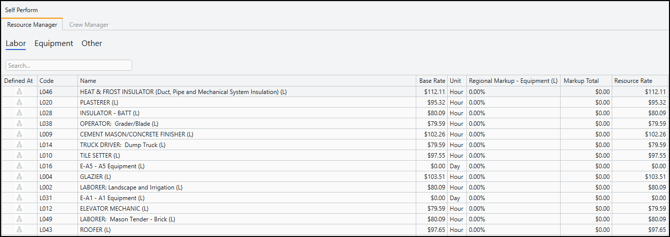
These values combine to determine the final Resource Rate used in cost calculations.
Example: Labor Resource
A Carpenter might be defined as:
|
Field |
Value |
|
Resource Type |
Labor |
|
Code |
TD01 |
|
Name |
Truck Driver: Dump Truck |
|
Base Rate |
$79.59 |
|
Unit |
Hour |
If Markups are applied, the final Resource Rate becomes the cost used in Crew and Line Item calculations.
Example: Equipment Resource
A Dump Truck might be defined as:
|
Field |
Value |
|
Resource Type |
Equipment |
|
Code |
DT01 |
|
Name |
Dump Truck |
|
Base Rate |
$85.00 |
|
Unit |
Hour |
Resources serve as the building blocks of every Self-Perform estimate.
Crews
A Crew represents how work is performed in the field by combining multiple Resources into a single production unit.
A Crew can include:
- Labor Resources
- Equipment Resources
- Other Resources
When a Crew is assigned to a Line Item, the Crew becomes the driver for Labor, Equipment, and Other cost calculations.
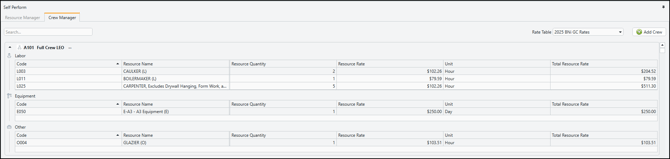
The following screenshot shows the Crew Manager tab in the Self Perform view where you can create Crews.
Example: Concrete Placement Crew
A Concrete Placement Crew might include:
| Resource | Quantity |
|---|---|
| Carpenter | 2 |
| Laborer | 2 |
| Concrete Pump | 1 |
| Pickup Truck | 1 |
Instead of entering costs independently for every resource, the estimator assigns the Crew enabling DESTINI Cloud to calculate costs automatically based on the Crew composition and productivity values.
Rate Tables
Rate Tables define how Resources are priced within an estimate.
A Rate Table typically contains:
- Resource Base Rates
- Rate Table Markups
- Market-specific pricing information
Rate Tables help organizations maintain consistent pricing across estimates while allowing costs to vary by market, wage scale, or region.
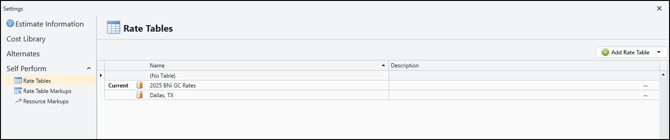
The following screenshot shows the Rate Tables page in Settings where you can select Rate Tables and choose one as the Current table.
Example: Regional Pricing
The same carpenter may have different costs depending on where the project is located.
| Rate Table | Carpenter Rate |
|---|---|
| Dallas, TX | $45/hr |
| Denver, CO | $52/hr |
| Seattle, WA | $60/hr |
By changing the Rate Table, costs update automatically without editing individual Resources or Crews.
How Data Enters an Estimate
Most Self-Perform data originates from Cost Library. Cost administrators maintain:
- Resources
- Crews
- Rate Tables
- Markup definitions
- Resources populate the Resource Manager.
- Crews populate the Crew Manager.
- Resource Markup definitions become available in Settings.
Users can also create or modify Self-Perform data directly within an estimate. These changes affect only the current estimate and do not impact Cost Library.
Example Self-Perform Workflow
The following example illustrates how Resources, Crews, and Rate Tables work together.
Scenario
A project requires installation of 500 linear feet of erosion-control fencing.
Step 1: Rate Table
The estimator selects the Dallas, TX Rate Table to establish Labor and Equipment pricing.
Step 2: Resources
Available resources include:
- Laborer
- Foreman
- Pickup Truck
- Small Tools
Step 3: Crew
A crew is assigned:
| Resource | Quantity |
|---|---|
| Laborer | 2 |
| Foreman | 1 |
| Pickup Truck | 1 |
| Small Tools | 3 |
Step 4: Productivity
The crew is expected to install:
- 20 linear feet per hour
Step 5: Cost Calculation
When the Crew is assigned to the Line Item, DESTINI Cloud automatically uses the following constructs to calculate Labor Cost, Equipment Cost, and Other Cost: Resource Rates
- Rate Table Markups
- Crew Composition
- Productivity Values
If productivity changes, costs are recalculated automatically.
Manual Costing vs. Crew-Based Costing
When a Crew is assigned:
-
Time-based Labor Costs are synchronized automatically.
-
Time-based Equipment Costs are synchronized automatically.
-
Time-based Other Costs are synchronized automatically.
-
Productivity values drive the calculation.
When no Crew is assigned:
-
Unit Costs are siloed.
-
Productivity calculations are not used.
-
Labor Cost, Equipment Cost, and Other Cost remain independently editable.
Key Benefits of Self Perform
Self-Perform estimating helps organizations:
- Standardize time-based Labor, Equipment, and Other pricing.
- Reuse proven Crew configurations.
- Compare productivity scenarios.
- Evaluate different market pricing conditions.
- Reduce independent/non-relational cost entry.
- Improve estimate consistency across projects.
By combining Resources, Crews, and Rate Tables, DESTINI Cloud provides a structured framework for estimating self-performed work while maintaining flexibility to adjust pricing and productivity as project conditions change.