
The Audit Trail allows you to track changes made to line items and other elements in your Estimate. It will show who made the change, what was changed, and when.
This can be a useful tool when inspecting your estimate for recent changes, hunting the origins of a possible error, or simply tracking team co-operation.
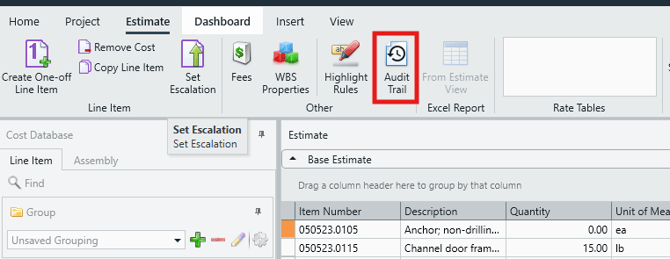
The Audit Trail is accessed via the Estimate View. Click on the Audit Trail button in the top ribbon.
The Audit Trail features the following columns:
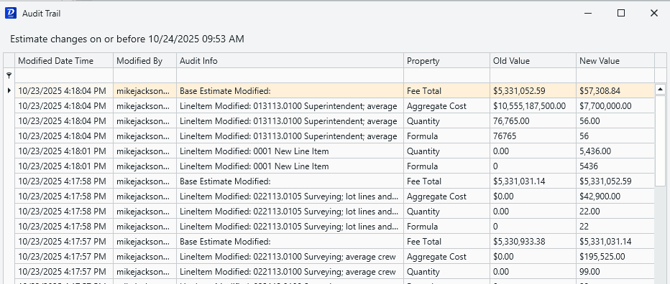
- Modified Date Time - The time the modification/change occurred.
- Modified by - The user that made the change, displayed as their sign-in username.
- Audit Info - A brief account of the action taken and the kind of change made.
- Property - Confirms the exact property that was changed (a formula, a fee, a name, etc.).
- Old Value - Keeps a record of the value before the change was made.
- New Value - Confirms the exact change that was made to said property.
Getting Audit Trail Data on a Specific Line Item
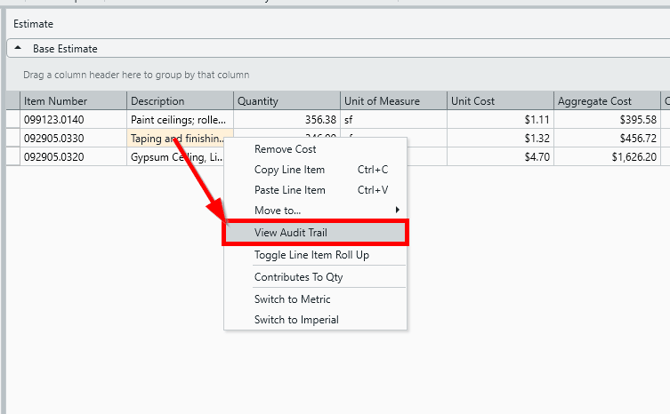
Accessing the Audit Trail via the button shown above is a great way to assess all changes made an estimate, but what if you're only interested in a specific line item? The quickest way to access audit data on a specific line item is by using the right-click menu in the Estimate View:
-
In the Estimate View, right-click on a given line item, and select View Audit Trail.
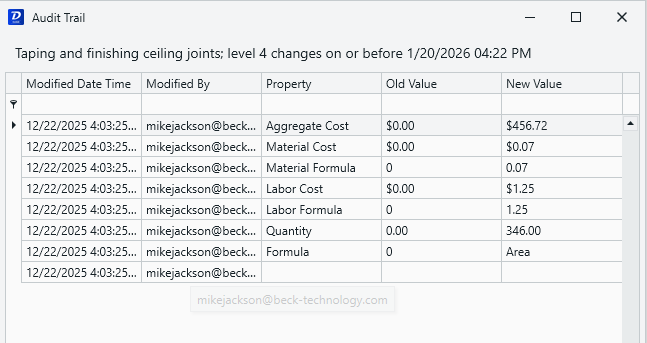
- The Audit Trail window will be displayed with information only pertaining to that specific line item.
Audit Trail Functions and Limitations
-
Updates are tracked by the Audit Trail as soon as the change is made.
-
The Audit Trail window is not updated live like the Estimate View. You will only see data up to the point at which you opened the Audit Trail window. Changes made while the Audit Trail is open will not show until you close and re-open the Audit Trail window.
-
Audit Trail data does not carry over to copied or versioned estimates. Even though they contain all the same cost items, those new estimates will start with a blank Audit Trail.