
In DESTINI Cloud, Self Perform data allows contractors and estimating teams to manage and price work executed by their own internal labor force and equipment fleet, rather than relying solely on lump-sum or turnkey subcontractor pricing.
Cost Library serves as the central administrative source of truth for all self-perform standards across your organization. By establishing your rates, burden markups, and crew configurations in the Cost Library, you ensure consistent, transparent, and standardized self-perform pricing across all company estimates.
Why Manage Self Perform Data in Cost Library?
- Centralized Governance: Maintain company-standard labor wages, equipment rental/operating costs, and fringe benefits in one place instead of recreating them in individual estimates.
- Flexible Multi-Rate Support: Build rate schedules to account for regional wage differences, union agreements, or annual wage escalations without duplicating line items.
- Reusable Crew Assemblies: Combine individual labor roles and machinery into realistic field crews that can be assigned directly to cost library line items.
- Seamless Downstream Updates: When market conditions or labor agreements change, update your rates centrally in the Cost Library and publish updates out to active projects.
Core Self-Perform Building Blocks
The Self Perform section of the Cost Library is built on four core components: Rate Tables, Resources, Resource Markups, and Crews. The relationship of these components is mapped in the following diagram:
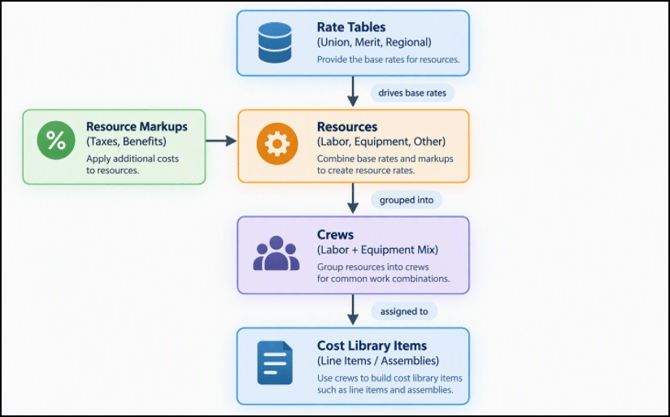
1. Rate Tables
Rate Tables represent pricing schedules or rate tiers. They define the pricing context applied to your resources.
- Common Use Cases: Geographic regions (e.g., Dallas, Denver, Atlanta), labor affiliations (e.g., Union vs. Open-Shop), or calendar years (e.g., 2026 vs. 2027 rates).
- Multi-Rate Mapping: A single resource (such as a Journeyman Carpenter) can exist once in your library, but carry distinct base rates across multiple Rate Tables.
- Default / Current Selection: You can establish a default or active Rate Table to drive baseline pricing across standard templates.
2. Resources
Resources are the fundamental cost elements required to execute work. In Cost Library, resources are categorized by type:
- Labor: Trades, skill levels, and craft classifications (e.g., Foreman, Journeyman Carpenter, Laborer).
- Equipment: Owned or rented machinery, tools, and vehicles (e.g., Skid Steer, 100-ton Crane, Scissor Lift).
- Other / Materials: Specialized consumables, support gear, or materials directly allocated to self-perform operations.
Each resource record captures:
- Code & Name: Unique identifiers following your standard cost accounting codes.
- Unit of Measure: Typically hourly (
HR), daily (DAY), or monthly (MO). - Base Rate: The base wage or operating cost per unit for each configured Rate Table.
3. Resource Markups (Burdens & Fringes)
Resource Markups represent indirect costs, statutory adders, fringe benefits, and overhead that convert a raw base rate into a fully burdened rate.
- Dollar ($) Markups: A fixed dollar addition per unit (e.g.,
$6.50/HRhealth insurance allowance). - Percent (%) Markups: A percentage calculated against the resource base rate or another markup (e.g.,
7.65%FICA payroll tax,12.00%worker’s compensation). - Calculation Basis ("Based On"): Markups can be simple (calculated strictly on the base rate) or tiered (calculated on the base rate plus specific preceding markups, allowing for compounding calculations).
4. Crews
Crews are reusable compositions of labor and equipment resources organized to perform specific field tasks (e.g., Concrete Pour Crew, Drywall Hanging Crew).
When defining a crew in Cost Library:
- Resource Makeup: Add the specific labor and equipment resources that comprise the crew.
- Composition / Quantities: Set the headcount or equipment units required (e.g., 1 Foreman, 4 Carpenters, 1 Helper, and 1 Forklift).
- Composite Rates: The Cost Library automatically computes the total crew cost per hour (and average crew cost per man-hour) by pulling the rates and markups of its constituent resources based on the selected Rate Table.
How Self-Perform Data Connects to Cost Library Line Items
Once your self-perform foundation is established, you can link it directly to your standard Line Items:
- Enable Crew Self Perform: On a line item’s details drawer, toggle Crew Self Perform on.
- Assign a Crew: Select the appropriate standard crew to execute the scope of work.
- Establish Productivity: Enter the expected production rate (e.g.,
Manhours / UnitorUnits / Day). - Calculated Unit Costs: The system utilizes the crew’s hourly rate along with your defined production rate to automatically calculate the line item’s Labor Cost/Unit and Equipment Cost/Unit, eliminating manual cost entry.
Publishing and Downstream Workflow
Changes made to self-perform entities in Cost Library do not immediately overwrite existing, locked estimates. To deploy updates across your team:
- Library Maintenance: Cost managers update resource rates, add new markups, or adjust crew configurations in the Cost Library web app.
- Publish Snapshot: Publish Cost Library to release a new version/snapshot to your organization.
- Estimator Consumption: Estimators working in DESTINI Cloud Estimator can refresh library data or choose to update the estimate's active Rate Table and crew data to reflect the latest published standards.
Quick Reference Summary
|
Entity |
Primary Purpose |
Key Fields / Settings |
|
Rate Table |
Sets regional or conditional wage schedules |
Table Name, Description, Active/Default status |
|
Resource |
Individual labor craft or machine unit |
Code, Name, Type (Labor/Equipment/Other), Unit of Measure, Base Rate per Rate Table |
|
Resource Markup |
Fringes, taxes, and overhead adders |
Markup Type ($ or %), Amount/Rate, Based On dependencies |
|
Crew |
Reusable field operational unit |
Crew Name, Resource Member List, Headcount/Quantities |
|
Line Item Link |
Connects crew and productivity to item scope |
Crew Assignment, Crew Self Perform toggle, Productivity/Manhour formulas |