
By default, DESTINI Cloud Estimator reports sort line items by Item Number. To customize the order of line items within each group, you can instead sort by the Takeoff Number column, which is hidden in the reports. This article describes how to enable Takeoff Number sorting using the Line Item Identification parameter.
Sort by Takeoff Number at Runtime
- Open an estimate in DESTINI Cloud Estimator.
- On the Home tab, click Reports in the ribbon and select a report. Report Viewer opens.
- In the Parameters panel on the left side of your screen, expand the Line Item Details group.
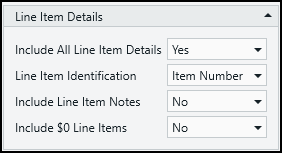
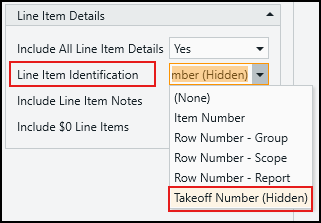
- In the Line Item Identification dropdown list, select Takeoff Number (Hidden).
- Click Submit.
Update the Default Value of the Parameter
- Navigate to Home > New Report. Report Designer opens.
- Click File > Open.
- Navigate to the folder with the report template file (.repx) you want to modify.
- Click the .repx file to open it.
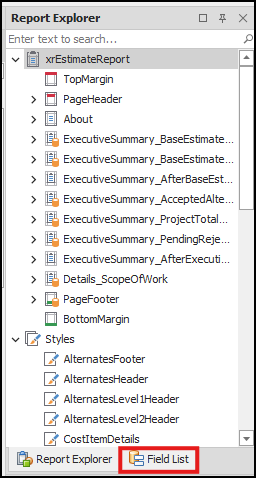
- In the Report Explorer panel on the right side of the screen, click the Field List tab.
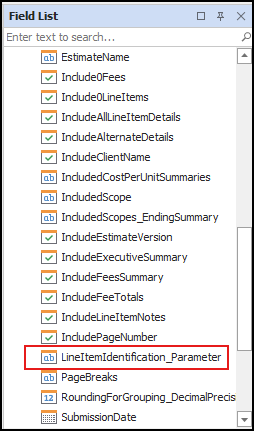
- At the bottom of the Field List, expand Parameters and select LineItemIdentification_Parameter.
- In the Properties panel below the Field List tab, enter Takeoff Number (Hidden) in the Value field and press Enter on your keyboard.
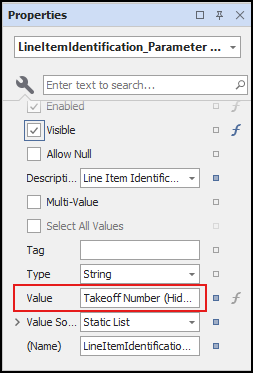
- Save and run your report.
Related Articles