
When you create an estimate in DESTINI Cloud Estimator, the estimate is embedded with a snapshot of your organization’s DESTINI Cloud Cost Library for your selected region. Changes made in the Cost Library—such as updated labor rates, revised assembly formulas, new WBS property values, or updated material costs—do not automatically overwrite active estimates in real time. This safeguards active estimates from unexpected pricing or formula shifts mid-bid.
When you need an existing estimate to reflect the latest published cost database updates, you can refresh its Cost Library snapshot from within the estimate settings.
Before You Begin
- Ensure Changes Are Published: Updates made in Cost Library remain in draft state until an administrator publishes the Region. An estimate can only pull in updates from a published snapshot.
- Review Active Line Items and Formulas: Refreshing the snapshot updates variable definitions and calculation formulas, which can trigger automatic recalculations on line items in your estimate.
- Save a Backup Copy (Recommended): Because updating the Cost Library snapshot updates formulas and properties across your estimate, consider making a copy or version of your estimate before refreshing.
What Happens When You Refresh: Understanding the Impacts
Refreshing your Cost Library snapshot does more than update catalog reference lists—it synchronizes core calculation logic.
1. Variables and Calculation Formulas (Intended Functionality)
- When an administrator alters formulas, input variable definitions, or conditional "Ask When" logic in Cost Library, those changes take effect in the estimate as soon as the snapshot is refreshed.
- Impact on Line Items: Line items and assembly outputs in the estimate that reference updated formulas will recalculate. This may result in changes to calculated quantities, unit costs, or total costs for items already placed in the estimate.
This recalculation is intended functionality. The estimate recalculates to ensure calculations align with your organization’s latest standard logic.
2. Work Breakdown Structure (WBS) Properties and List Values
- New Available Values: Any new list items added to Cost Library WBS properties become available in the estimate’s dropdown menus.
- Renamed Properties: WBS property renames defined in Cost Library will update in the estimate. If a Cost Library rename matches an estimate-specific custom property, the custom property is automatically adjusted to preserve uniqueness.
- Hierarchies: Updated parent-child relationship definitions are updated for hierarchical properties.
3. Unit Costs, Rate Tables, and Crews
- Catalog Rates: Line items added from Cost Library after the refresh will use the new snapshot rates.
- Existing Items: Line items tied to updated self-perform rate tables or crew compositions will reflect updated composite calculations.
- Manual Overrides: Items with manually edited flat unit costs are preserved unless you run a bulk cost update and choose to overwrite overrides.
Best Practices
- Communicate Before Publishing: Cost database administrators should notify estimating teams when major formula or variable changes are published so teams know when to expect recalculations.
- Audit Estimate Totals After Refreshing: Always review your estimate view, summary totals, and dashboards immediately after refreshing the snapshot to verify changes in line item quantities and costs.
- Coordinate Milestone Freezes: Avoid refreshing Cost Library snapshots immediately before a bid deadline or client submission to prevent unintended last-minute total variances.
How to Refresh a Cost Library Snapshot
To update the embedded Cost Library data in an active estimate:
- In DESTINI Estimator, navigate to Settings (the gear icon in the top right corner) and click Cost Library.
- Click Check for Updates. DESTINI Cloud Estimator checks whether a newer published snapshot exists for your estimate’s assigned Region.
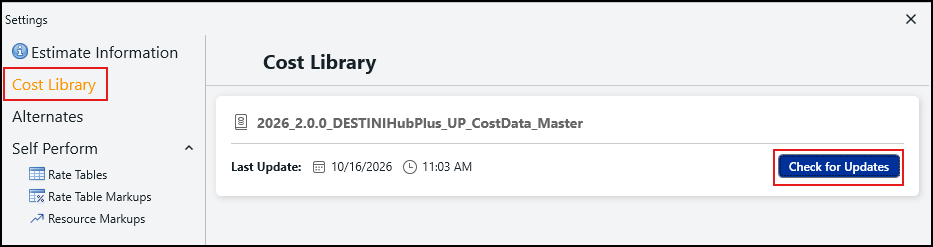
- If updates are available, click Update.
- Allow the update to process. Estimator refreshes its embedded snapshot to match the latest published version.
If your Cost Library updates include renamed Work Breakdown Structure (WBS) properties or new list values, navigate to Estimate > WBS Properties on the ribbon and click Update From Database after completing the snapshot update.
Troubleshooting & FAQ
|
Question / Issue |
Cause |
Solution |
|
"Check for Updates" reports no updates available. |
The Cost Library changes have been saved in draft mode but not yet published. |
Have a Cost Library administrator go to Regions, select the estimate's region, and click Publish. |
|
Line item quantities or costs changed after updating. |
An assembly formula, variable calculation, or crew rate was updated in Cost Library. |
This is intended functionality. Review the updated line items against the Cost Library change log to verify new calculation logic. |
|
New WBS property values do not appear in the estimate. |
The snapshot was refreshed, but the WBS Properties table has not been synced. |
Go to Estimate > WBS Properties and click Update From Database. |
|
Can I undo a snapshot refresh? |
Snapshot updates overwrite underlying database definitions for the estimate. |
A snapshot refresh cannot be reversed with a single undo. Restore an earlier version or copy of the estimate if you need the prior state. |