
A Bid Package can only be pushed once from DESTINI Estimator to DESTINI Bid Day. Bid Packages created during the Create Project process in DESTINI Cloud Estimator can't be pushed a second time without first removing them from the Bid Project in Bid Day.
To ensure accurate and complete line-item data, finalize your bid package in DESTINI Cloud Estimator before pushing it to Bid Day. If an incomplete bid package has already been pushed, you can remove it from the Bid Project and push it again by following the steps below.
To perform this procedure, you must be assigned the Project Admin role for the bid project in Bid Day. Removing a bid package from a bid project permanently deletes all data associated with that package, including subcontractors, line items, bid values, and any other related information. This action can't be undone.
Re-push a Bid Package
- Log in to DESTINI Bid Day.
- Click the name of a project to open it.
- In the upper right corner, click Edit Project. If you don't see this option, you don't have Admin permissions for the project.
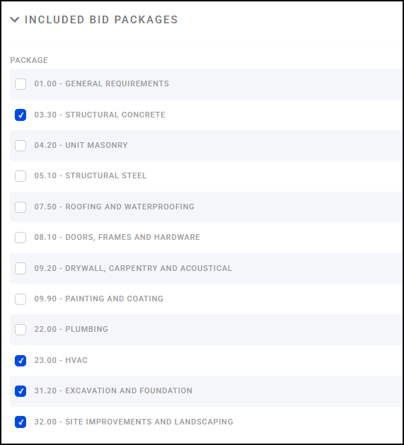
- In the Included Packages section, clear the check box for the bid package you want to re-push, and then click Save.
- Open DESTINI Cloud Estimator.
- On the Estimate View, click Push Items.

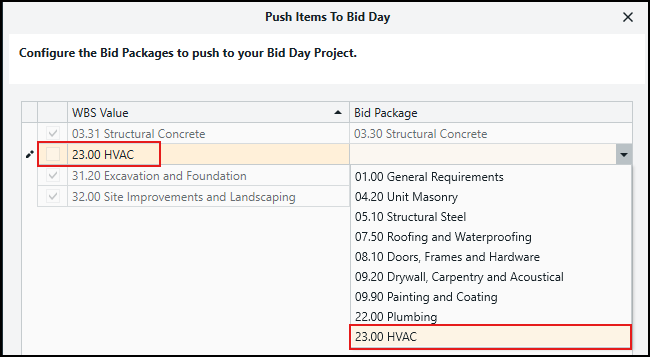
- For the package you removed from Bid Day, re-select it from the Bid Package dropdown list.
- Click Push.
- In Bid Day, verify that the bid package contains the correct line-item data.
You can repeat this process as needed until the bid package is populated with the desired data. However, each time you remove a bid package from the bid project, all associated Bid Day data for that package is permanently deleted and must be recreated after the re-push.
Best Practice
Before pushing a bid package to DESTINI Bid Day, review the package in DESTINI Estimator to confirm that all line items, quantities, and pricing information are complete and accurate. Doing so helps minimize the need to remove and re-push packages later in the bidding process.