
By default, DESTINI Cloud Estimator reports can print either your Alternate Fees or the summed total of those fees. If you prefer, you can include both in a report.
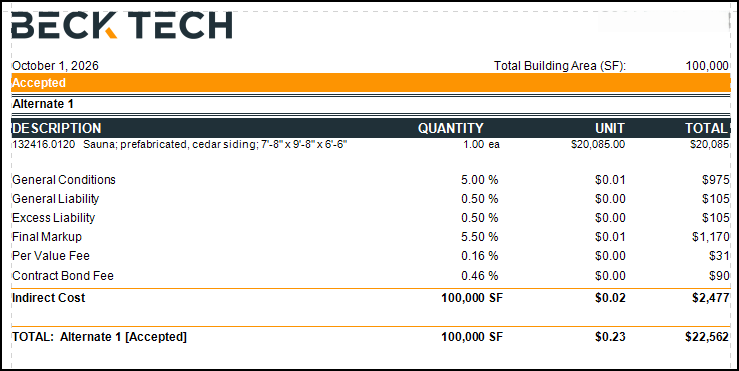
This article describes how to display the Alternate Fees and their summed Indirect Cost for each alternate in your report.
Parameter Changes
- Open an estimate in DESTINI Cloud Estimator.
- Navigate to Home > New Report. Report Designer opens.
- Click File > Open.
- Navigate to the folder with the report template file (.repx) you want to modify.
- Click the .repx file to open it.
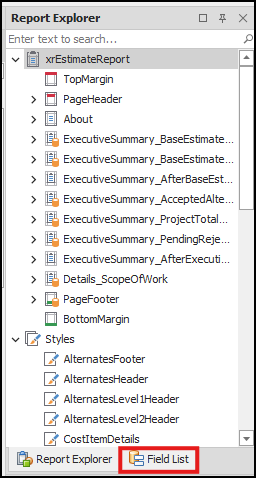
- In the Report Explorer panel on the right side of the screen, click the Field List tab.
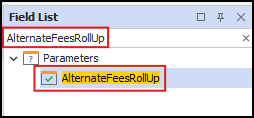
- In the Field List, search for and select AlternateFeesRollUp.
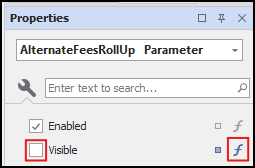
- In the Properties panel below the Field List tab, clear the Visible checkbox and then click the Function button.
- In Expression Editor, delete the expression and click OK.

Designer Changes
- At the bottom of the Field List panel, click the Report Explorer tab.
- Search for and select ReportFooter5.
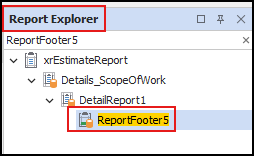
- In Designer in the middle of your screen, locate the band selected in the previous step.

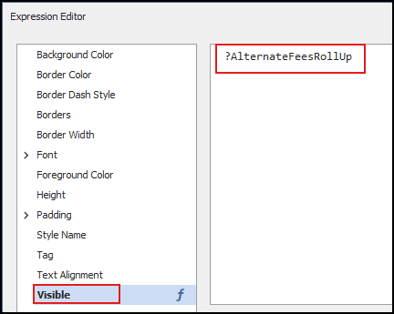
- Click the Function button on the right. Expression Editor opens.

- In the left pane, click Visible, delete the existing expression, and click OK.
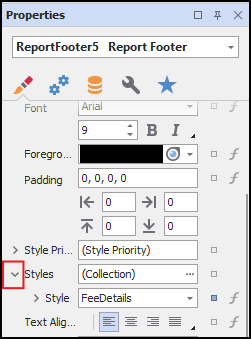
- In the Properties panel below Report Explorer, expand Styles.
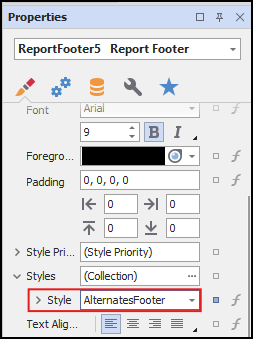
- In the Style dropdown list, select AlternatesFooter.
- (Optional) Below the Styles property, set Height to 40.
- Save and run your report
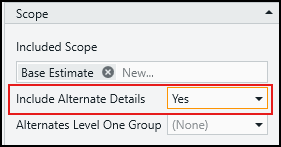
- In the Report Viewer Parameters panel, locate the Scope section.
- Set the Include Alternate Details parameter to Yes and click Submit.
- The report prints the Alternate Fees and their summed Indirect Cost for each alternate in your report.
Related Articles
- How to Change the Included Scope of Work in a DESTINI Cloud: Estimator report
- How to Print Base Estimate Fees at bottom of a Cloud Report