
The Per Value fee type lets you apply a fee based on a specified dollar value, such as a fee charged per $1,000 of project value.
For example, if the fee is set to $0.50 per $1,000, a $5,000,000 project would generate a fee of $2,500.
The Per Value fee type functions similarly to a percentage-based fee. In the example above, $0.50 per $1,000 is equivalent to a 0.05% fee. However, instead of entering a percentage, you define the fee as a fixed amount charged for a specified dollar value (for example, $0.50 per $1,000).
This fee type is commonly used when fee schedules are defined on a per value basis and can also serve as an alternative to a bond fee calculation.
- Open an estimate in DESTINI Cloud Estimator.
- Click Estimate > Fees. The Fee Editor opens.

- Click Insert Fee > Per Value.
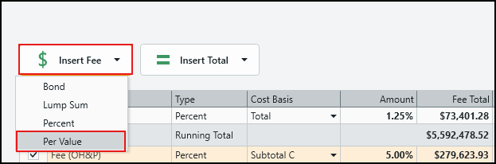
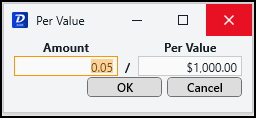
- In the Amount column for the new fee, click the $ sign. The Per Value dialog box opens.

- Enter the desired values in the Amount and Per Value fields.
Fee totals automatically update.