
Fee Distribution allows you to allocate project fees proportionally across estimate items so that fee costs become part of the estimate's item-level pricing. This feature is commonly used when fees such as General Conditions, Insurance, Bonds, Overhead, or other project costs must be included in item costs for reporting, bid comparison, or downstream cost analysis.
When you distribute a fee, DESTINI Cloud Estimator calculates each item's share of the selected fee based on the fee's cost basis and adds the distributed amount to the item's cost.
Why Distribute Fees?
You may want to distribute fees when:
- Allocating overhead or indirect costs across all estimate items.
- Preparing cost data for integration with external systems.
- Evaluating the impact of project-level fees on individual assemblies, systems, or bid packages.
- Producing estimates that include fee-adjusted unit costs.
Distributing a Fee
- Open an estimate in DESTINI Cloud Estimator.
- In the ribbon, navigate to Estimate > Fees. The Fee Editor opens.
- Create a new fee or select the fee you want to distribute.
- Click Distribute Fee on the toolbar or choose the distribution option from the fee's context menu.
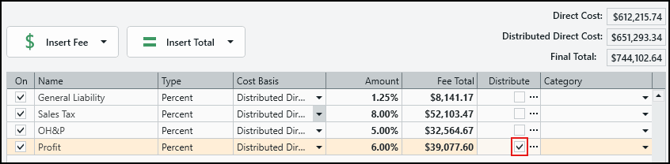
- Click the parenthesis (...) to review the distribution settings. The Fee Distribution dialog box opens.
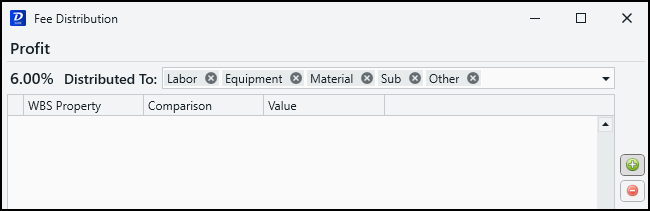
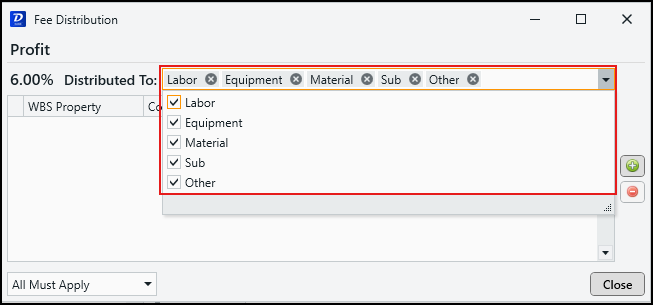
- Click the Distributed To dropdown list to select or clear cost categories for the fee.
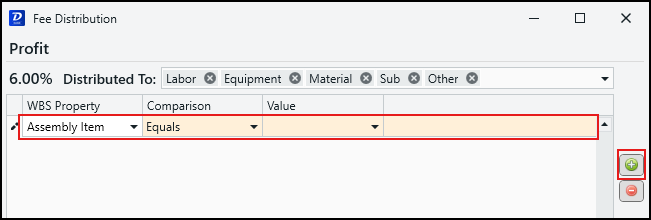
- Click on the + icon to add custom criteria for fee distribution. Custom criteria allow tighter control over where your fee is distributed by letting you restrict distribution to a single standard or custom WBS. Use the - icon to delete unwanted criteria.
- Configure how to apply the distribution. When you have more than one distribution criteria, it is important to set how these criteria are applied in the dropdown.
- All Must Apply: The fee is only distributed to line items that meet all of the listed criteria. Use this setting for a more restricted distribution method.
- Any Can Apply: The fee will be distributed to line items that meet any of the listed criteria. This is useful if you have several separate conditions that you'd like to specify for distribution.
- Confirm the distribution.
DESTINI Cloud Estimator calculates each item's proportional share of the fee and applies the distributed amount throughout the estimate.
The distribution is based on the fee's configured cost basis. For example, a fee calculated from Direct Cost distributes differently than a fee calculated from Total Cost.
Understanding Fee Distribution
Assume an estimate contains:
|
Item |
Cost |
|
Concrete |
$100,000 |
|
Structural Steel |
$200,000 |
|
Finishes |
$50,000 |
|
Total Cost |
$350,000 |
A project fee of $35,000 is distributed based on Total Cost.
The distribution would be:
|
Item |
Original Cost |
Distributed Fee |
Adjusted Cost |
|
Concrete |
$100,000 |
$10,000 |
$110,000 |
|
Structural Steel |
$200,000 |
$20,000 |
$220,000 |
|
Finishes |
$50,000 |
$5,000 |
$55,000 |
|
Total |
$350,000 |
$35,000 |
$385,000 |
Each item receives a proportionate share of the fee based on its percentage of the total cost.
Reviewing Distributed Fees
After distributing a fee, you can:
- Review item costs in the Estimate Grid.
- Analyze fee impacts using estimate reports.
- Compare original and distributed cost values.
- Validate fee allocations before publishing or exporting estimate results.
If you modify a fee's percentage, amount, or cost basis after distribution, redistribute the fee to ensure that all estimate items reflect the most current fee values.
Removing a distribution does not delete the fee itself. The fee remains available and can be edited or redistributed later.
Best Practices
- Finalize fee calculations before distributing fees.
- Review cost basis settings to ensure fees distribute as intended.
- Recalculate distributions after major estimate revisions.
- Verify distributed values using estimate reports.
- Avoid distributing temporary or exploratory fees that may change frequently.