
DESTINI Cloud: Estimator reports include a built-in feature that repeats the WBS Property 1 value at the top of each page in a line-item detail report. When enabled, [Continued] is automatically appended to the WBS Property 1 value on every page after the first. This feature is disabled by default.
This article explains how to enable the parameter at runtime and configure your reports so this setting is enabled by default.
Repeat Level 1 Every Page at Runtime
- Open an estimate in DESTINI Cloud: Estimator.
- Navigate to Home > Find and Run Report.
- Click the report you want to run, and then click Open. Report Viewer displays the report.
- In the Parameters section on the left side of your screen, locate the WBS Groupings section.
- If the Level One Group drop-down is empty, select a property from the list.
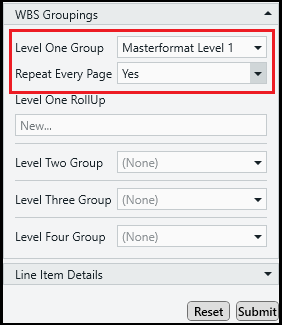
- Set Repeat Every Page to Yes. By default, this property applies to Level One Group properties only. Standard reports don't support repeating Level 2 or lower properties.
- Click Submit.
Update the Default Value for the Parameter
- Open an estimate in DESTINI Cloud: Estimator.
- Navigate to Home > New Report. Report Designer opens.
- Click File > Open.
- Navigate to the folder with the report template file (.repx) you want to modify.
- Click the .repx file to open it.
- On the right side of your screen, click the Field List tab at the bottom of Report Explorer.
- Scroll to the bottom of the Field List tab and expand Parameters.
- Click WBSProperty1_Repeat. The Properties panel displays at the bottom right side of your screen.
- In the Value field, click Yes.
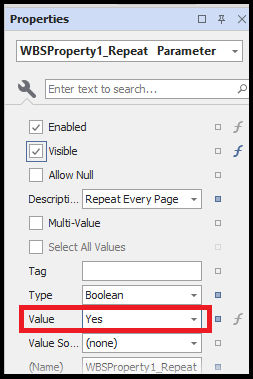
- Save and run your report.