
The Cloud Cost Category Report (also known as the Cloud LMSEO Report) provides a detailed cost category breakdown for each line item. You can summarize cost category details on the Executive Summary page by adding a Totals column, as described in this article.
This article describes how to add a Labor Total Cost column to the Base Estimate Level 1 Summary. You can repeat this procedure to add additional cost category totals to the report.
- Open an estimate in DESTINI Cloud: Estimator.
- Navigate to Home > New Report. Report Designer opens.
- Click File > Open.
- Navigate to the folder with the report template file (.repx) you want to modify.
- Click the .repx file to open it.
- In the Designer in the middle of your screen, locate the column headers for your Base Estimate Level 1 Summary.
- Right-click the Description column header and select Insert > Cell, as shown in the following screenshot.
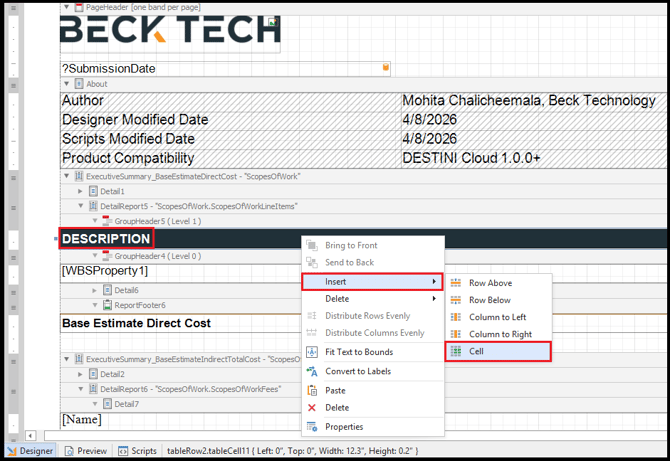
- Report Designer inserts the new cell to the right of the Description cell.
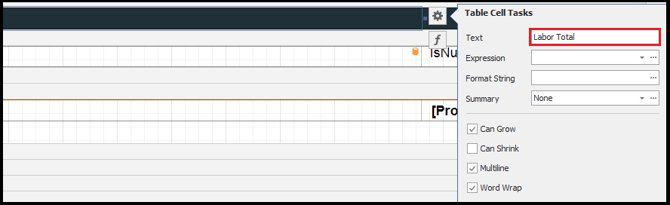
- With the new cell selected, click the Gear button and set Text as Labor Total, as shown in the following screenshot.
- Right-click the [WBSProperty1] cell below the Description column header and select Insert > Cell, as shown in the following screenshot.
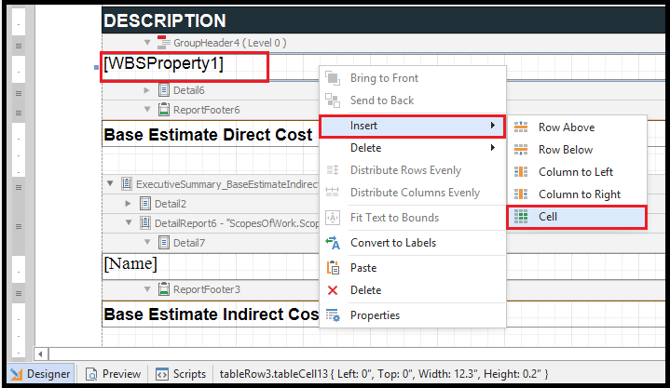
- With the new cell selected, click the Gear button. Inside the context menu, specify the following. Set the Summary property first, otherwise the expression generates an error.
- Summary = Group
- Format String =
{0:c0} - Expression =
Iif(sumSum([TotalLaborCost]) = 0, '', sumSum([TotalLaborCost]))
- Using the Ctrl key, multi-select both new cells.
- Locate the Properties panel on the bottom right side of your screen.
- Set the Text Alignment to right justified and adjust the cell width based on your preference, as shown in the following screenshot. If you can't see these options, widen your Properties panel.
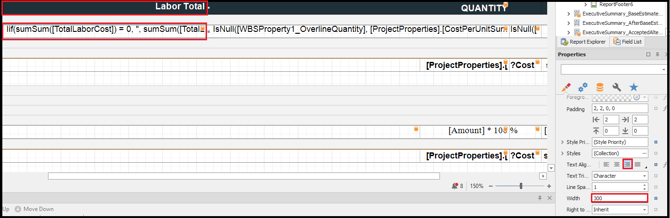
- If you'd like to add additional cost categories to your report, repeat this procedure. Specify the following expressions for each cost category. When you're finished, save and run the report.
|
Cost Category |
Expression |
|
Labor |
|
|
Material |
|
|
Equipment |
|
|
Sub |
|
|
Other |
|