
The About band in the Standard Report template files is a space for users to document high-level information such as who authored a report and when the report was last modified.
Report developers are expected to keep these documentation elements up to date. Proper maintenance of this information will assist in providing effective support to report developers and users.
The 'About' Band
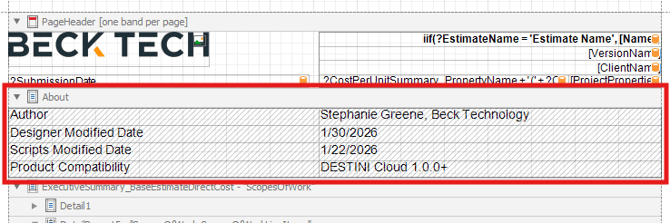
Every Standard Report has an 'About' band at the top of the report below the PageHeader band. This band can be expanded and hidden using the property Visibility = False. Inside the About band, there is a hidden table (also Visibility = False) that contains the following information:
- Author: Name, Company responsible for changes.
- Designer Modified Date: Date that the Designer tab was last modified.
- Scripts Modified Date: Date that the Scripts tab was last modified.
- Product Compatibility: DESTINI product name and minimum compatible version.
After making changes to a report file, report developers should update the Author, Designer Modified Date, Scripts Modified Date, and Product Compatibility information accordingly.
Report Tag
For product usage purposes, all our reports have a Tag assigned at the main Report level. To view the report’s Tag:
- Click anywhere in the white margin to select the whole report.
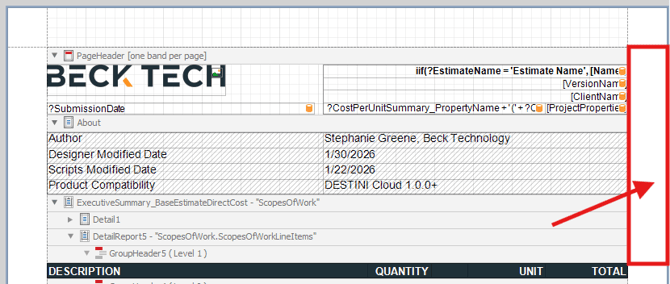
- Navigate to the Properties section on the lower-right side of the screen.
- Select the Data tab.
- Find the property called 'Tag'.
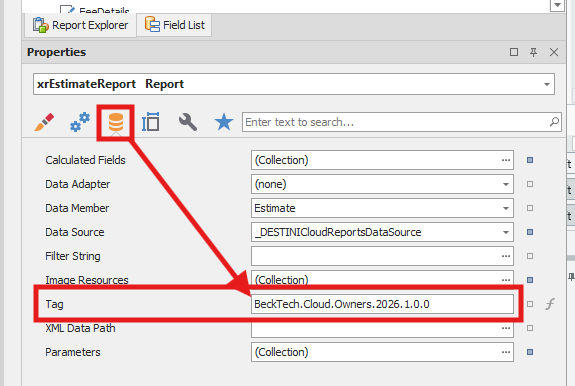
The Tag is formatted in such a way that it is comprised of the following elements (in order):
- Author’s Company (i.e. BeckTech)
- Platform (Cloud)
- Report Type (i.e. Owners, LMSEO, etc.)
- Product Compatibility (2026.1.0.0)
Report developers are expected to maintain Author’s Company and Report Type information.
Scripts Modified Date
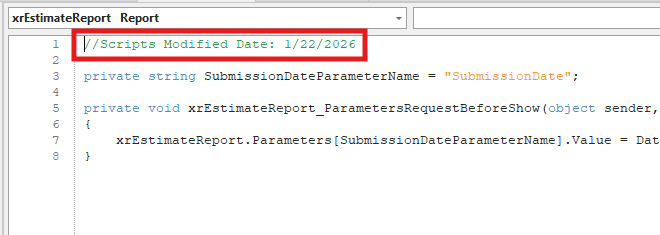
The Scripts Modified Date is included as a comment inside the Scripts tab. This comment is located at the top of the script.
Report developers are expected to maintain the Scripts Modified Date value when making scripting changes.
Submit Your Suggestions to Help Improve This Article